Перевірте, чи протестована наша програма CarteBlanche Navigator, на вашому навігаторі. Зверніться з відповідним запитом до нашої служби технічної підтримки. Можливо, потрібно буде надати навігатор до нашого офісу для тестування сумісності навігатора з програмним забезпеченням iGO.
Кожна з програм в меню має сторінку з інформацією про карти з відповідними відомостями про авторські права, а також сторінку з інформацією про ліцензію та з унікальним ліцензійним кодом. Якщо такі сторінки з інформацією відсутні в меню, або в назві ліцензії присутні слова DEMO, BETA, чи Worldwide — це говорить про те, що програмний продукт не ліцензійний. Такі продукти не оновлюються через сайт www.naviextras.com,
а також не забезпечуються нашою технічною підтримкою.
Перевірте перед тим, як придбати навігатор.
Так. Рекомендуємо вам зробити резервну копію вмісту картки і зберегти її на жорсткому диску свого комп’ютера та/або на компакт-диску чи DVD. В разі збоїв в роботі картки пам’яті, ви зможете відформатувати картку пам’яті і записати на неї збережену резервну копію. Для форматування картки пам’яті сайт рекомендує використовувати програму Panasonic SDFormatter (безкоштовна). Інструкція користувача цієї програми англійською мовою.
В програмах iGO 8, CarteBlanche Navigator, iGO Amigo, iGO Primo файл карти має покриття всієї території тої чи іншої країни (за винятком США, де це стосується окремих штатів). Тому карт окремих міст чи областей просто не існує. Ці карти включені до карти держави.
Так, це в ряді випадків можна зробити. Детальніше — див. «Як оновити карти для програми iGO 8 для КПК та для навігаторів на основі iGO 8.0/8.3?».
Кожна з програм в меню має сторінку з інформацією про карти з відповідними відомостями про авторські права, а також сторінку з інформацією про ліцензію та з унікальним ліцензійним кодом. Якщо такі сторінки з інформацією відсутні в меню, або в назві ліцензії присутні слова DEMO, BETA, чи Worldwide — це говорить про те, що програмний продукт не ліцензійний. Такі продукти не оновлюються через сайт www.naviextras.com,
а також не забезпечуються нашою технічною підтримкою.
Перевірте перед тим, як придбати навігатор.
При пошуку за адресою, після кожного введеного символу програма автоматично проводить аналіз усіх можливих варіантів слів і підсвічує (залишає активними) тільки ті клавіші клавіатури, для яких є варіанти продовження пошуку.
Коли ви активували в навігаторі певний маршрут, а потім дорожня ситуація примусила вас відхилитись від нього (через дорожні роботи чи затори), заново задавати новий маршрут не потрібно, маршрут буде перераховано автоматично, як тільки програма виявить відхилення від раніше заданого варіанту маршруту.
Інтелектуальне масштабування автоматично буде змінювати масштаб карти з тим, щоб якнайкраще показати як поворот чи розв’язку (укрупнюючи масштаб, що робить зображення розв’язки більш детальним), так і прямі відтинки маршруту (масштаб робиться дрібнішим, щоб краще показати увесь відтинок маршруту до наступного повороту). Масштаб може бути змінений також і вручну.
Якщо у вашому навігаторі встановлена карта, старіша за версію 2013.03, оновіть карту до останньої версії. Починаючи з версії карти 2013.03, при виборі російської мови меню програми карта України буде відображатися російською мовою, крім того, додано можливість пошуку російською. В більш давніх версіях використовувався загальний підхід розробника програми, тобто, коли мова програми збігалася з державною мовою країни, — карта виводилася на екран цією мовою. Якщо для меню програми було обрано будь-яку іншу мову, карта відображалася латиницею, з використанням транслітерації з мови країни.
Так, програма iGO підтримує роботу з приймачами системи TMC. Проте, на даний час ця система TMC не працює в Україні.
TMC (Traffic Message Channel — Канал повідомлень про інтенсивність дорожнього руху) — це технологія, розроблена для повідомлень водію інформації про стан дорожнього руху. Сигнал TMC несе в собі спеціальним чином закодовану інформацію про інтенсивність дорожнього руху, час і місце для кожного відрізку мережі доріг і передається через передавачі FM-діапазону або через систему цифрового радіомовлення (DAB) або через супутникову трансляцію радіосигналу. Ці повідомлення декодуються спеціальними приймачами TMC-сигналу, що підключені до навігатора. Інформацію про інтенсивність дорожнього руху водій буде бачити на екрані навігатора. Як правило, послуги системи TMC платні. На даний час в Україні система TMC ще не працює.
В програмах iGO 8, CarteBlanche Navigator, iGO Amigo, iGO Primo файл карти має покриття всієї території тої чи іншої країни (за винятком США, де це стосується окремих штатів). Тому карт окремих міст чи областей просто не існує. Ці карти включені до карти держави.
Так, це в ряді випадків можна зробити. Детальніше — див. «Як оновити карти для програми iGO 8 для КПК та для навігаторів на основі iGO 8.0/8.3?».
Зверніться з відповідним запитом до нашої служби технічної підтримки. Можливо, потрібно буде надати навігатор до нашого офісу для тестування сумісності навігатора з програмним забезпеченням iGO.
Так, це в ряді випадків можна зробити. Детальніше — див. «Як оновити карти для програми iGO 8 для КПК та для навігаторів на основі iGO 8.0/8.3?».
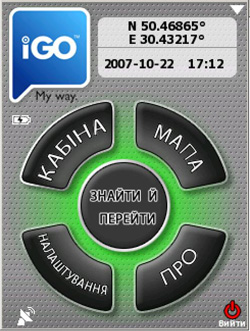
Для того, щоб визначити, яка саме програма встановлена в навігаторі, включіть навігатор, запустіть програму навігації, порівняйте екран головного меню з екранними знімками на сторінках опису iGO My Way 2006 Plus та iGO 8.
Карти України для КПК-версії iGO My Way 2006 Plus та для навігаторів на основі цієї версії програми оновлюються через службу технічної підтримки у нас в офісі. Оскільки в жовтні 2009 року компанія NNG — розробник програми iGO My Way 2006 Plus повідомила про припинення технічної підтримки та оновлення карт для цієї програми, оновлення карти України можливе лише до версії 2009.02 (за перший квартал 2009 року). Крім того, за умови сумісності навігаційного обладнання, ви можете придбати навігаційне програмне забезпечення iGO 8 для КПК/комунікаторів з ОС Windows Mobile чи CarteBlanche Navigator для портативних навігаторів та мультимедійних систем.
Нажаль, оновити карту України можна лише в нашому офісі. Якщо ви мешкаєте в іншому місті, можете вислати картку з навігаційною програмою однією з кур’єрських служб доставки з доставкою в наш офіс. Повідомте свій контактний номер телефону та/чи адресу електронної пошти. Після оновлення ми вишлемо картку накладною оплатою назад, на узгоджену з вами адресу.
Програмне забезпечення та карти для iGO 8 як для КПК, так і для навігаторів на основі цієї програми оновлюються через сайт www.naviextras.com/shop/portal. Перелік навігаторів, оновлення яких підтримується через цей портал. Інструкція щодо оновлення програмного забезпечення та карт англійською мовою та її український переклад.
Зверніться до служби технічної підтримки за інформаційними матеріалами, що пояснюють особливості інтерфейсу цієї мультимедійної системи.
ВАЖЛИВО: до уваги користувачів Pioneer AVIC- F500BT (Pioneer AVIC- -F900BT)!
1. Не оновлюйте прошивку навігаційної системи самостійно з сайту.
Після такого оновлення прошивки навігатор перестає працювати з картою України з картки пам’яті SD.
2. При оновленні карт на картці пам'яті SD з допомогою програми Naviextras Toolbox через сайт НЕ ОНОВЛЮЙТЕ програмне забезпечення v.8.0 до v.8.3, оновлюйте лише карти. Оскільки навгаційна програма Pioneer AVIC- F500BT/Pioneer AVIC- -F900BT грунтується на v.8.0, то в разі оновлення програмного забезпечення на картці пам'яті SD до v.8.3 ви отримаєте карти, які будуть несумісні з програмним забезпеченням навігатора.
Якщо у вашому навігаторі встановлена карта, старіша за версію 2013.03, оновіть карту до останньої версії. Починаючи з версії карти 2013.03, при виборі російської мови меню програми карта України буде відображатися російською мовою, крім того, додано можливість пошуку російською. В більш давніх версіях використовувався загальний підхід розробника програми, тобто, коли мова програми збігалася з державною мовою країни, — карта виводилася на екран цією мовою. Якщо для меню програми було обрано будь-яку іншу мову, карта відображалася латиницею, з використанням транслітерації з мови країни.
Так, програма iGO підтримує роботу з приймачами системи TMC. Проте, на даний час ця система TMC не працює в Україні.
Для того, щоб визначити, яка саме програма встановлена в навігаторі, включіть навігатор, запустіть програму навігації, порівняйте екран головного меню з екранними знімками на сторінках опису iGO My Way 2006 Plus та iGO 8.
Див. перелік версій карти з описом змін.
В програмах iGO 8, CarteBlanche Navigator, iGO Amigo використовується європейська система нумерації будинків, яка, втім, повною мірою не відбиває українських реалій. Система нумерації будинків з дробовою частиною та з буквами не підтримується. Використовуйте пошук по першому числу в комбінації.
Текстовий файл, що стосується камер стеження, потрібно скопіювати до папки SD/iGO8/content/speedcam.
В меню –> «Налаштування» -> «Попередження» -> «Попередження про камеру безпеки» поставте галочку. В полі з «…» поряд виберіть бажані режими
для звукового та візуального попереджень.
Так. Рекомендуємо вам зробити резервну копію вмісту картки і зберегти її на жорсткому диску свого комп’ютера та/або на компакт-диску чи DVD. В разі збоїв в роботі картки пам’яті, ви зможете відформатувати картку пам’яті і записати на неї збережену резервну копію. Для форматування картки пам’яті сайт рекомендує використовувати програму Panasonic SDFormatter (безкоштовна). Інструкція користувача цієї програми англійською мовою.
Ці мультимедійні системи мають 2 рівні калібровки екрану. Щоб виправити ситуацію, перезапустіть систему, натиснувши кнопку «Reset» або витягніть ключ запалювання з замка, почейте хвилину і вставте ключ до замка знову. Після завантаження системи відразу ж перейдіть на сторінку навігації, натиснувши позаекранну кнопку «Nav» і, як тільки з’явиться заставка з екранними кнопками «Navi» та «Adjust», натисніть кнопку «Adjust» до того моменту, коли з’явиться символ пісочного годинника. Відкалібруйте екран заново. Якщо цей метод не спрацює, зверніться до служби технічної підтримки.
Таке повідомлення може з’явитися, якщо вимикати живлення цього навігатора, не вийшовши попередньо з програми навігації. Зверніться до служби технічної підтримки.
Для установки програми необхідно відредагувати файл на самому навігаторі в папці Program Files/iGO8/sys.txt так, щоб його вміст мав наступний вигляд:
[folders]

        app="%SDCARD%/iGO8"


        [interface]

        maxzoom2d=6000000

        show_exit=1


        [device]

        type="ASUS A6X6"


        [rawdisplay]

        driver=gdi
Зверніться до служби технічної підтримки за інформаційними матеріалами, що пояснюють особливості інтерфейсу цієї мультимедійної системи.
ВАЖЛИВО: до уваги користувачів Pioneer AVIC- F500BT (Pioneer AVIC- -F900BT)!
1. Не оновлюйте прошивку навігаційної системи самостійно з сайту.
Після такого оновлення прошивки навігатор перестає працювати з картою України з картки пам’яті SD.
2. При оновленні карт на картці пам'яті SD з допомогою програми Naviextras Toolbox через сайт НЕ ОНОВЛЮЙТЕ програмне забезпечення v.8.0 до v.8.3, оновлюйте лише карти. Оскільки навгаційна програма Pioneer AVIC- F500BT/Pioneer AVIC- -F900BT грунтується на v.8.0, то в разі оновлення програмного забезпечення на картці пам'яті SD до v.8.3 ви отримаєте карти, які будуть несумісні з програмним забезпеченням навігатора.
Для роботи програми потрібно не менше 30 МБ вільної оперативної пам’яті. Перевірте (Пуск -> Налаштування
-> Система -> Пам’ять) об’єм вільної оперативної пам’яті, та в разі потреби, закрийте всі запущені програми на КПК чи комунікаторі (Пуск
-> Налаштування
-> Система -> Пам’ять -> Запущені програми).
Увага! Піктограма Х в операційній системі Microsoft® Windows Mobile™ означає згортання вікна програми,
а не її закриття.
Перевірте, чи протестована наша програма CarteBlanche Navigator, на вашому навігаторі. Зверніться з відповідним запитом до нашої служби технічної підтримки. Можливо, потрібно буде надати навігатор до нашого офісу для тестування сумісності навігатора з програмним забезпеченням iGO.
Так. Рекомендуємо вам зробити резервну копію вмісту картки і зберегти її на жорсткому диску свого комп’ютера та/або на компакт-диску чи DVD. В разі збоїв в роботі картки пам’яті, ви зможете відформатувати картку пам’яті і записати на неї збережену резервну копію. Для форматування картки пам’яті сайт рекомендує використовувати програму Panasonic SDFormatter (безкоштовна). Інструкція користувача цієї програми англійською мовою.
Зверніться з відповідним запитом до нашої служби технічної підтримки. Можливо, потрібно буде надати навігатор до нашого офісу для тестування сумісності навігатора з програмним забезпеченням iGO.
Ці мультимедійні системи мають 2 рівні калібровки екрану. Щоб виправити ситуацію, перезапустіть систему, натиснувши кнопку «Reset» або витягніть ключ запалювання з замка, почейте хвилину і вставте ключ до замка знову. Після завантаження системи відразу ж перейдіть на сторінку навігації, натиснувши позаекранну кнопку «Nav» і, як тільки з’явиться заставка з екранними кнопками «Navi» та «Adjust», натисніть кнопку «Adjust» до того моменту, коли з’явиться символ пісочного годинника. Відкалібруйте екран заново. Якщо цей метод не спрацює, зверніться до служби технічної підтримки.
Таке повідомлення може з’явитися, якщо вимикати живлення цього навігатора, не вийшовши попередньо з програми навігації. Зверніться до служби технічної підтримки.
Для установки програми необхідно відредагувати файл на самому навігаторі в папці Program Files/iGO8/sys.txt
так, щоб його вміст мав наступний вигляд:
[folders]

        app="%SDCARD%/iGO8"


        [interface]

        maxzoom2d=6000000

        show_exit=1


        [device]

        type="ASUS A6X6"


        [rawdisplay]

        driver=gdi
Зверніться до служби технічної підтримки за інформаційними матеріалами, що пояснюють особливості інтерфейсу цієї мультимедійної системи.
ВАЖЛИВО: до уваги користувачів Pioneer AVIC- F500BT (Pioneer AVIC- -F900BT)!
1. Не оновлюйте прошивку навігаційної системи самостійно з сайту.
Після такого оновлення прошивки навігатор перестає працювати з картою України з картки пам’яті SD.
2. При оновленні карт на картці пам'яті SD з допомогою програми Naviextras Toolbox через сайт НЕ ОНОВЛЮЙТЕ програмне забезпечення v.8.0 до v.8.3, оновлюйте лише карти. Оскільки навгаційна програма Pioneer AVIC- F500BT/Pioneer AVIC- -F900BT грунтується на v.8.0, то в разі оновлення програмного забезпечення на картці пам'яті SD до v.8.3 ви отримаєте карти, які будуть несумісні з програмним забезпеченням навігатора.
Ні, програми iGO My Way 2006 Plus та iGO 8 працюють лише з приладами на основі ОС Windows Mobile (КПК, комунікатори), Windows CE.NET (спеціальні версії програм для того чи іншого навігатора), є також версії програми для ОС Android та iPhone.
Операційна система Microsoft® Windows Mobile™
Процесор з тактовою частотою 300 MHz (рекомендується 400 MHz)
64 МБ оперативної пам’яті (рекомендується 128 МБ)
Сенсорний дисплей
Будь ласка, перечитайте Інструкцію. Як у ній написано, видаліть з картки пам'яті найбільш великі за розміром файли, попередньо зробивши їх резервну копію на вінчестері комп'ютера. Видаляйте лише файли і збережіть структуру папок на картці пам'яті. Зазвичай це файли з папок iGO8/content/lang (мови меню), iGO8/content/dem (3D рельєф), iGO8/content/map (власне файли карт). Процес оновлення потребує додаткового місця на картці пам'яті для завантаження тимчасових копій файлів карт. Після оновлення ви зможете скопіювати всі або частину раніше видалених файлів з резервної копії назад, на картку пам'яті.
Всі торгівельні марки, згадані на сайті, є власністю їх законних правовласників.
© 2005–2016 «Карт Бланш Україна»